# Data wrangling
library(tidyverse)

# Very comprehensive package for IRT analyses
library(mirt)

# Extension for 'mirt'
# devtools::install_github("masurp/ggmirt")
library(ggmirt)How to run IRT analyses in R
R & Statistics
This post provides an introduction to fitting item response theory (IRT) models in R. From my experience, most scholars in the social sciences have heard about IRT as an alternative to classical test theory (and its m…
This post provides an introduction to fitting item response theory (IRT) models in R. From my experience, most scholars in the social sciences have heard about IRT as an alternative to classical test theory (and its methods such as EFA or CFA), but have never really worked with it. I believe that this is unfortunate as it offers a lot of advantages and insights into the validity and reliability of tests and items. In this tutorial, I will use the R packages mirt (multidimensional item response theory, version 1.36.1; Chalmers, 2022, CRAN page) and ggmirt (an extension I wrote to provide publication-ready plotting functions: https://github.com/masurp/ggmirt).
Introduction
IRT refers to a set of mathematical models which aim to explain the relationship between a latent ability, trait, or proficiency (denoted \(\theta\)) and its observable manifestations (e.g., multiple-choice questions, true-false items, items…). In contrast to classical test theory (CTT), IRT focuses on the pattern of responses and considers responses in probabilistic terms, rather than focusing on composite variables and linear regression theory. IRT thereby accounts for…
- item discrimination: ability of an item to differentiate between respondents with different levels of proficiency.
- item difficulty: the likelihood of a correct response, expressed as the proficiency level at which 50% of the participant sample is estimated to answer an item correctly.
- Depending on the model some other parameters such as e.g., guessing probability…
Assessing item difficulties is useful in matching the test and trait levels of a target population and in ensuring that the entire range of the proficiency is covered. Therefore, there are several advantages to IRT models (compared to CTT models):
The stronger focus on item difficulty generally leads to scales that perform better at differentiating at the extremes of proficiency.
Item banks that are developed using IRT often provide a good basis for creating smaller scales or parallel tests that still exhibit a high validity and reliability.
It allows for computer adaptive testing (CAT). This approach can greatly approach the efficiency of testing. In CAT, the test items are selected to match each individual’s proficiency, so that the s/he will not be bored by easy items or frustrated by overly difficult items.
Specific IRT models (e.g., the Rasch model, see further below) has specific mathematical properties that are highly desirable, such as a) the number-correct score is a sufficient estimation of \(\theta\), b) specific objectivity, which means that item and person parameters will be similar even if only a subset of the item pool is used or a different population is studied.
The theoretical background of IRT models is to comprehensive to be covered here. Rather, this tutorial aims to introduce the main models and discuss their properties. For further study, we refer to the excellent book “Item Response Theory” by Christine DeMars. In this short introductory tutorial, we focus on three of the most used IRT models: the 3PL model, the 2PL model, and finally the 1PL or Rasch model. These models are named by the number of item parameter used in the function that models the relationship between \(\theta\) and the item response (0/1). Each model has unique properties but all of them are suited to estimate latent variables from binary items (e.g., knowledge tests), which we will deal with in this tutorial. There are also more complex IRT models, such as e.g., graded response models, which can be used for non-binary items (e.g., likert-type scales). Yet, these will be discussed in a more advanced tutorial.
Preparation and Data
Although we are going to focus on the the package mirt in this tutorial, there are actually several packages that can be used to estimated IRT models. The most common ones are ltm, eRm, or TAM. This article by Choi & Asilkalkan (2019) also provides an overview of all available packages and their specific advantages: https://doi-org.vu-nl.idm.oclc.org/10.1080/15366367.2019.1586404. For this tutorial, we are going to load the tidyverse (for data wrangling and visualization) and mirt (for the main IRT analyses). And as noted before, we further are going to load my package ggmirt, which represents an extension to mirt and provides functions to plot more publication-ready figures and helps to assess item, person, and model fit.
For ggmirt package includes a convenient function to simulate data for IRT analyses. Let’s quickly create a data set with 500 observations and 10 items that should fit a 3PL, 2PL and perhaps even a 1PL model.
set.seed(42)
d <- sim_irt(500, 10, discrimination = .25, seed = 42)
head(d)| V1 | V2 | V3 | V4 | V5 | V6 | V7 | V8 | V9 | V10 |
|---|---|---|---|---|---|---|---|---|---|
| 0 | 1 | 0 | 1 | 0 | 1 | 1 | 1 | 0 | 1 |
| 0 | 1 | 1 | 0 | 0 | 0 | 0 | 0 | 0 | 1 |
| 0 | 1 | 0 | 1 | 0 | 1 | 0 | 1 | 0 | 0 |
| 0 | 0 | 1 | 0 | 0 | 1 | 0 | 0 | 0 | 1 |
| 0 | 1 | 1 | 1 | 0 | 0 | 1 | 1 | 1 | 0 |
| 0 | 0 | 1 | 0 | 0 | 0 | 0 | 1 | 0 | 1 |
As you can see, each “participants” has answered 10 items that are binary. Imagine we would have administered a test (e.g., LSAT, PISA, knowledge test, exam,…) to 500 people. The score 1 means this person has answered a particular question/item correctly. The score 0 means, this person has answered this item falsely.
3PL model
The 3PL model takes item discrimination (first parameter: a), item difficulty (second parameter: b), and guessing probability (third parameter: c) into account. As such, the 2PL and 1PL model (discussed below, are special cases, or constrained versions of the 3PL model). Take a look at Fig. 1 below. It shows a typical item characteristic curve (ICC, but not to be mistaken for the intra-class correlation). The x-axis shows the latent ability (\(\theta\)) ranging from -4 to 4, with 0 being the average ability in the studied population. The y-axis shows the probability of solving the item. The curve thus represents the probability of answering this item given a certain level on the latent ability.
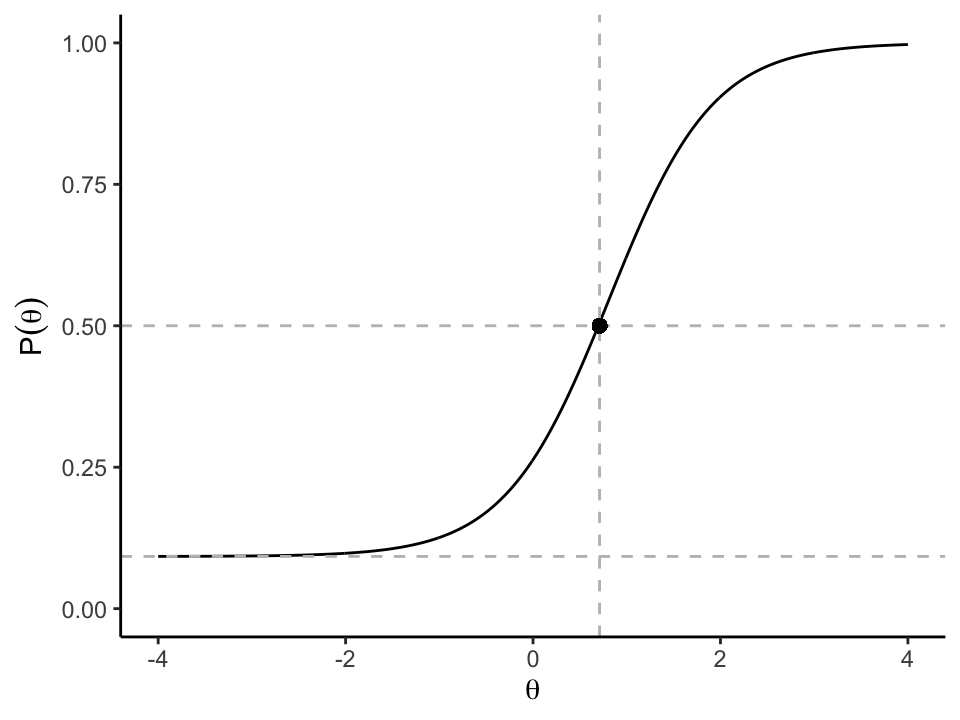
In this example, this 3PL model provides a smooth curve for this item because it is based on item discrimination (steepness of the slope), difficulty (point of inflexion at which the probability of answering the item correctly is 50%) and the guessing probability (slightly raised lower asymptote). The mathematical form of the 3PL model is:
\[P(\theta_j) = c_i + (1-c_i)\frac{e^{1.7a_i(\theta_j-b_i)}}{1+e^{1.7a_i(\theta_j-b_i)}}\]
Here, the probability of a correct response \(P(\theta)\) given a person’s ability \(\theta\) is expressed as a function of all three item parameters and a person’s ability, where \(i\) indicates the item and \(j\) indicates an individual person. In the figure, the steeper the slope, the better the item is at differentiating people clearly in close proximity to its difficulty. The lower the asymptote, the lower the likelihood of selecting the right response by chance. As the item difficulty (point of inflexion is slightly above the average: 0.71), the item can be solved by a majority of potential participants.
So how do we fit such a model?
Fitting the model
To fit any IRT model, we simply use the function mirt(). In a first step, we specify the model itself. In this case, we simply want to estimate a uni-dimensional model, so we use the following string command "Factor = item_1 - item_n". The syntax for specifying models is comparatively simple, but for more complex (e.g., multidimensional models), see the some examples using ?mirt. It makes sense to save this string in a separate object.
Next, we provide the function itself with
- the data set, which only contains the relevant variables (i.e., potential id variables have to be excluded)
- the previously specifed model (string)
- the type of model we want to estiamte (in this case “3PL”)
I am adding verbose = FALSE to not print information about the iterations. But you can remove this as well.
unimodel <- 'F1 = 1-10'

fit3PL <- mirt(data = d,
               model = unimodel,  # alternatively, we could also just specify model = 1 in this case
               itemtype = "3PL",
               verbose = FALSE)
fit3PL
#>
#> Call:
#> mirt(data = d, model = unimodel, itemtype = "3PL", verbose = FALSE)
#>
#> Full-information item factor analysis with 1 factor(s).
#> Converged within 1e-04 tolerance after 24 EM iterations.
#> mirt version: 1.45.1
#> M-step optimizer: BFGS
#> EM acceleration: Ramsay
#> Number of rectangular quadrature: 61
#> Latent density type: Gaussian
#>
#> Log-likelihood = -2738.689
#> Estimated parameters: 30
#> AIC = 5537.377
#> BIC = 5663.816; SABIC = 5568.594
#> G2 (993) = 497.87, p = 1
#> RMSEA = 0, CFI = NaN, TLI = NaNThe created object is of class “SingleGroupClass” and contains all necessary information and data to assess the model. By running the object itself, we get some information about the type of estimation as well as some model fit indices (including AIC and BIC), which can be used to compare models with one another.
Understanding IRT parameter
To a certain degree, an IRT analysis is similar to a factor analysis in CTT. If we use the summary() function, we get the so-called factor solution including factor loadings (F1) and the communalities (h2), which are squared factor loadings and are interpreted as the variance accounted for in an item by the latent trait. Almost all of the items in this case have a substantive relationship (loadings > .50) with the latent trait.
# Factor solution
summary(fit3PL)
#> F1 h2
#> V1 0.707 0.500
#> V2 0.513 0.264
#> V3 0.535 0.286
#> V4 0.727 0.529
#> V5 0.574 0.329
#> V6 0.566 0.320
#> V7 0.603 0.364
#> V8 0.443 0.196
#> V9 0.718 0.516
#> V10 0.480 0.230
#>
#> SS loadings: 3.534
#> Proportion Var: 0.353
#>
#> Factor correlations:
#>
#> F1
#> F1 1In IRT, however, we are usually more interested in the actual IRT parameters as discussed above (discrimination, difficulty and guessing probability). They can be extracted as follows:
params3PL <- coef(fit3PL, IRTpars = TRUE, simplify = TRUE)
round(params3PL$items, 2) # g = c = guessing parameter
#> a b g u
#> V1 1.70 1.17 0.00 1
#> V2 1.02 -0.58 0.00 1
#> V3 1.08 0.35 0.00 1
#> V4 1.80 0.81 0.09 1
#> V5 1.19 0.52 0.00 1
#> V6 1.17 -0.14 0.00 1
#> V7 1.29 1.87 0.00 1
#> V8 0.84 0.03 0.00 1
#> V9 1.76 2.11 0.00 1
#> V10 0.93 -0.05 0.01 1The values of the slope (a-parameters) parameters ranged from 0.84 to 1.80. This parameter is a measure of how well an item differentiates individuals with different theta levels. Larger values, or steeper slopes, are better at differentiating people. A slope also can be interpreted as an indicator of the strength of a relationship between and item and latent trait, with higher slope values corresponding to stronger relationships.
The location or difficulty parameters (b-parameter) is also listed for each item. Location parameters are interpreted as the value of theta that corresponds to a .50 probability of responding correctly at or above that location on an item. The location parameters show that the items cover a wide range of the latent trait.
Model fit, person fit, and item fit evaluation
Similar to factor analytical approaches, we can assess how well the model fits the data. Rather than using a a \(\chi^2\) statisic, we use a specific index, M2, which is specifically designed to assess the fit of item response models.
M2(fit3PL)| M2 | df | p | RMSEA | RMSEA_5 | RMSEA_95 | SRMSR | TLI | CFI | |
|---|---|---|---|---|---|---|---|---|---|
| stats | 17.77133 | 25 | 0.8519424 | 0 | 0 | 0.0203603 | 0.033713 | 1.018438 | 1 |
As we can see, the M2 statistic is comparatively low and non-significant. So there are no concerning differences between the model and the data. This is further supported by a very low RMSEA and a CFA and TLI of 1.
In IRT, however, we are usually more interested in item– and person-fit indices. IRT allows us to assess how well each items fits the model and whether the indiviual response patterns align with the model.
Let us start with item fit: Similar to many other areas, different indices have been proposed to assess item fit. We can use the function itemfit() to get a variety of them. By default, we receive the S_X2 by Orlando and Thissen (2000) and the corresponding dfs, RMSEA and p-values. This test should be non-significant to indicate good item fit. As we can see here, only item V9 shows a lower fit with the model. Proponents of the “Rasch Model” (see further below) often rather report infit and outfit statistics. We can get those by adding the argument fit_stats = "infit"). We get both mean-squared and standardized versions of these measures (Linacre provides some guidelines to interpret these: https://www.rasch.org/rmt/rmt162f.htm). Roughly speaking the non-standardized values should be between .5 and 1.5 to not be degrading. In the package ggmirt, we can also use the function itemfitPlot() to inspect this visually.
itemfit(fit3PL)| item | S_X2 | df.S_X2 | RMSEA.S_X2 | p.S_X2 |
|---|---|---|---|---|
| V1 | 4.708662 | 4 | 0.0188425 | 0.3185173 |
| V2 | 2.503355 | 5 | 0.0000000 | 0.7759897 |
| V3 | 6.761645 | 5 | 0.0265720 | 0.2389791 |
| V4 | 3.700650 | 5 | 0.0000000 | 0.5932672 |
| V5 | 4.093206 | 5 | 0.0000000 | 0.5360762 |
| V6 | 2.824089 | 5 | 0.0000000 | 0.7270838 |
| V7 | 8.648072 | 5 | 0.0382381 | 0.1239519 |
| V8 | 2.901227 | 5 | 0.0000000 | 0.7152104 |
| V9 | 11.610311 | 4 | 0.0617477 | 0.0204970 |
| V10 | 2.693987 | 5 | 0.0000000 | 0.7470379 |
itemfit(fit3PL, fit_stats = "infit") # typical for Rasch modeling| item | outfit | z.outfit | infit | z.infit |
|---|---|---|---|---|
| V1 | 0.6386014 | -2.365002 | 0.8743268 | -1.7362580 |
| V2 | 0.8481622 | -3.058789 | 0.8705611 | -3.7125518 |
| V3 | 0.8320215 | -3.792355 | 0.8794736 | -3.4444110 |
| V4 | 0.8362322 | -2.532776 | 0.8729352 | -2.5664209 |
| V5 | 0.8035407 | -3.634037 | 0.8727943 | -3.1862993 |
| V6 | 0.8104688 | -4.158982 | 0.8432826 | -4.6042826 |
| V7 | 0.7308953 | -1.594022 | 0.9935245 | -0.0331537 |
| V8 | 0.8929857 | -3.419761 | 0.9110881 | -3.2959229 |
| V9 | 0.5264292 | -1.359471 | 1.0527710 | 0.3834487 |
| V10 | 0.8713525 | -3.689040 | 0.8945440 | -3.6438640 |
itemfitPlot(fit3PL)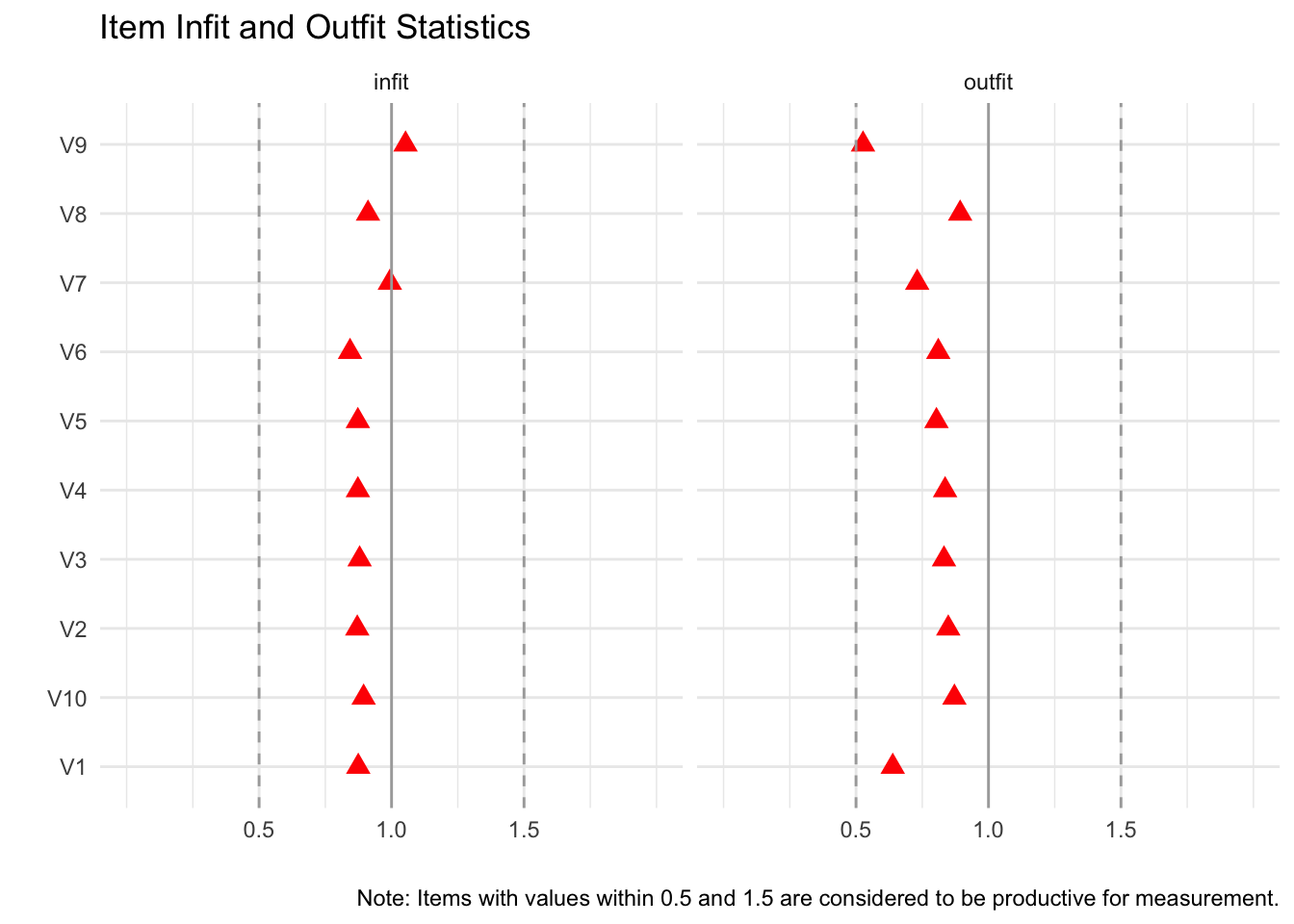
We again see that item V9 has a lower fit (outfit value close to .5), but according to Linacre’s guidelines, this should not be concerning.
Assessing person fit
We can technically produce the exact same measures for each person to assess how well each person’s response patterns aligns with this model. Think about it this way: If a person with a high theta (that is high latent ability) answers does not answer an easy item correctly, this person does not fit the model. Conversely, if a person with a low ability answer a very difficult question correctly, it likewise doesn’t fit the model. In practice, there will most likely be a few people who do not fit the model well. But as long as the number of non-fitting respondents is low, we are good. We mostly look again at infit and outfit statistics. If less than 5% of the respondents have higher or lower infit and outfit values than 1.96 and -1.96, we are good.
head(personfit(fit3PL))| outfit | z.outfit | infit | z.infit | Zh |
|---|---|---|---|---|
| 1.0161479 | 0.1749541 | 1.0183924 | 0.1584039 | -0.0732308 |
| 0.6331922 | -0.1327510 | 0.8411215 | -0.4976128 | 0.5615934 |
| 0.7456650 | -0.1905736 | 0.8912849 | -0.3611853 | 0.4390657 |
| 0.7209540 | -0.0392887 | 0.9571507 | -0.0637470 | 0.2601261 |
| 2.1363674 | 2.3695393 | 1.7713727 | 2.1832656 | -2.6948633 |
| 0.7538809 | 0.0610415 | 1.0221023 | 0.1724740 | 0.0843561 |
personfit(fit3PL) %>%
  reframe(infit.outside = prop.table(table(z.infit > 1.96 | z.infit < -1.96)),
outfit.outside = prop.table(table(z.outfit > 1.96 | z.outfit < -1.96))) # lower row = non-fitting people| infit.outside | outfit.outside |
|---|---|
| 0.958 | 0.98 |
| 0.042 | 0.02 |
personfitPlot(fit3PL)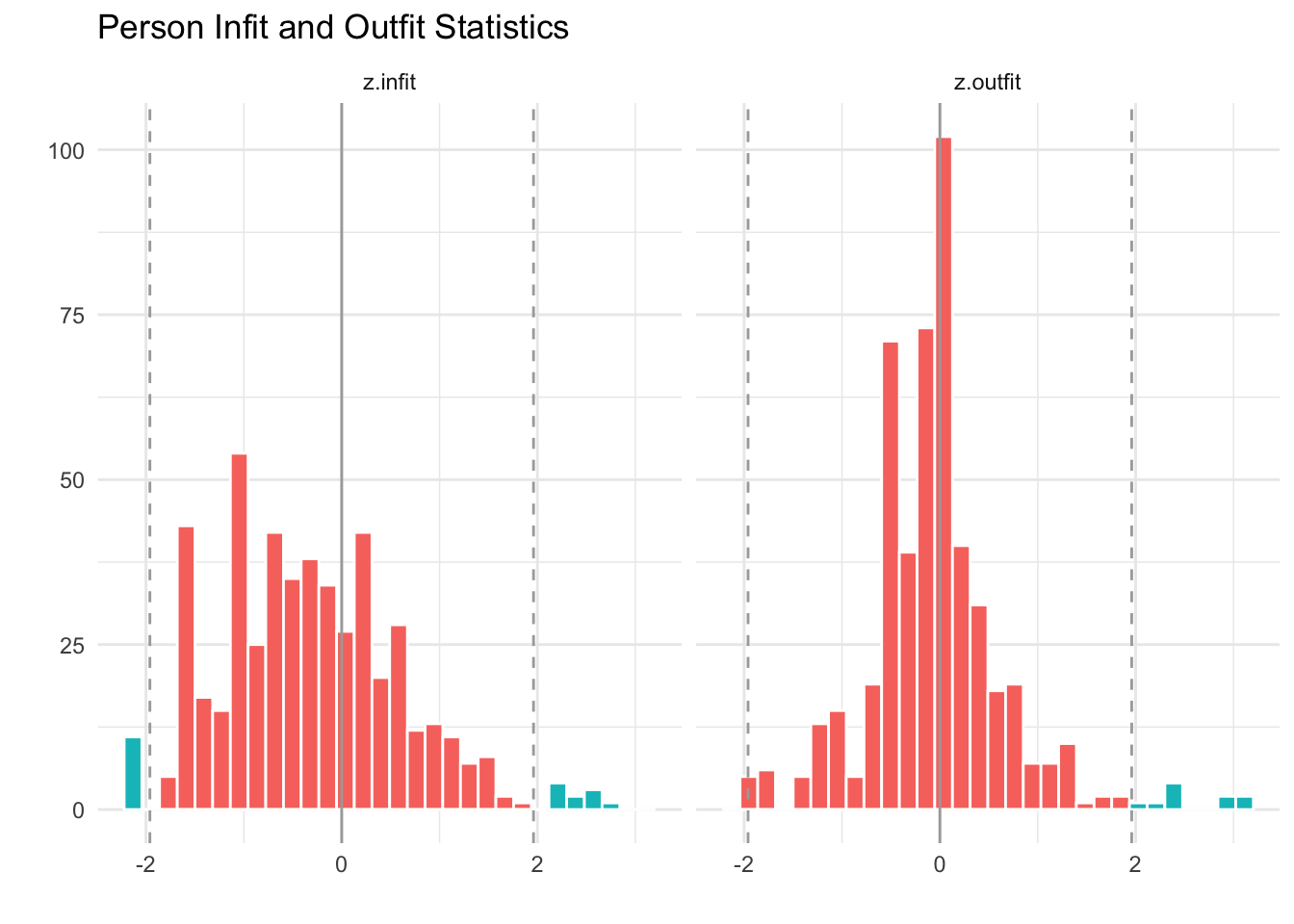
Typical IRT plots
Next to overall model fit, item and person fit, we can evaluate many more things. Some typical questions include:
- How well do the items cover the range of the latent ability?
- Is there any redundancy in the items?
- At what theta levels does the scale perform best?
A lot of these questions can be answered by visualizing different aspects of the IRT models.
Item Person Map (Wright Map)
The first question can be assessed using a so-called “Item Person Map” (also known as Kernel Density Plots or Wright Maps). This visualization first plots the distribution of the latent ability in the studied sample. Next, we also plot each item’s difficulty on the same theta scale. Aligning both plots shows us how well the items cover the latent ability.
itempersonMap(fit3PL)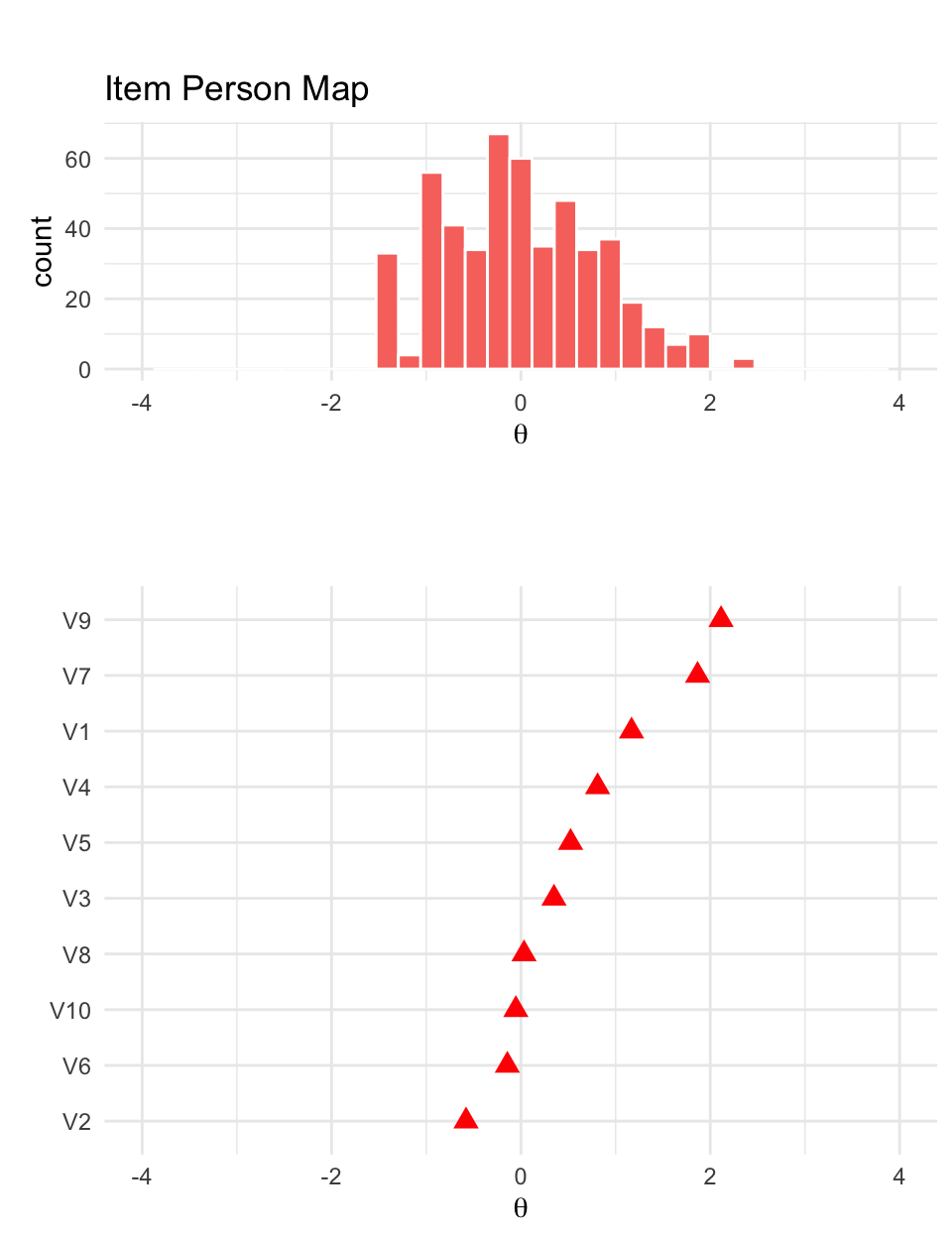
Item Characteristics Curves (Trace Plots)
Item characteristic curves or trace plots (we already saw one earlier) visualize all three IRT parameters for all the items. This visualization is helpful in better understanding the unique properties of each item. It can also be helpful to identify gaps in assessment as well as differences in slope
tracePlot(fit3PL)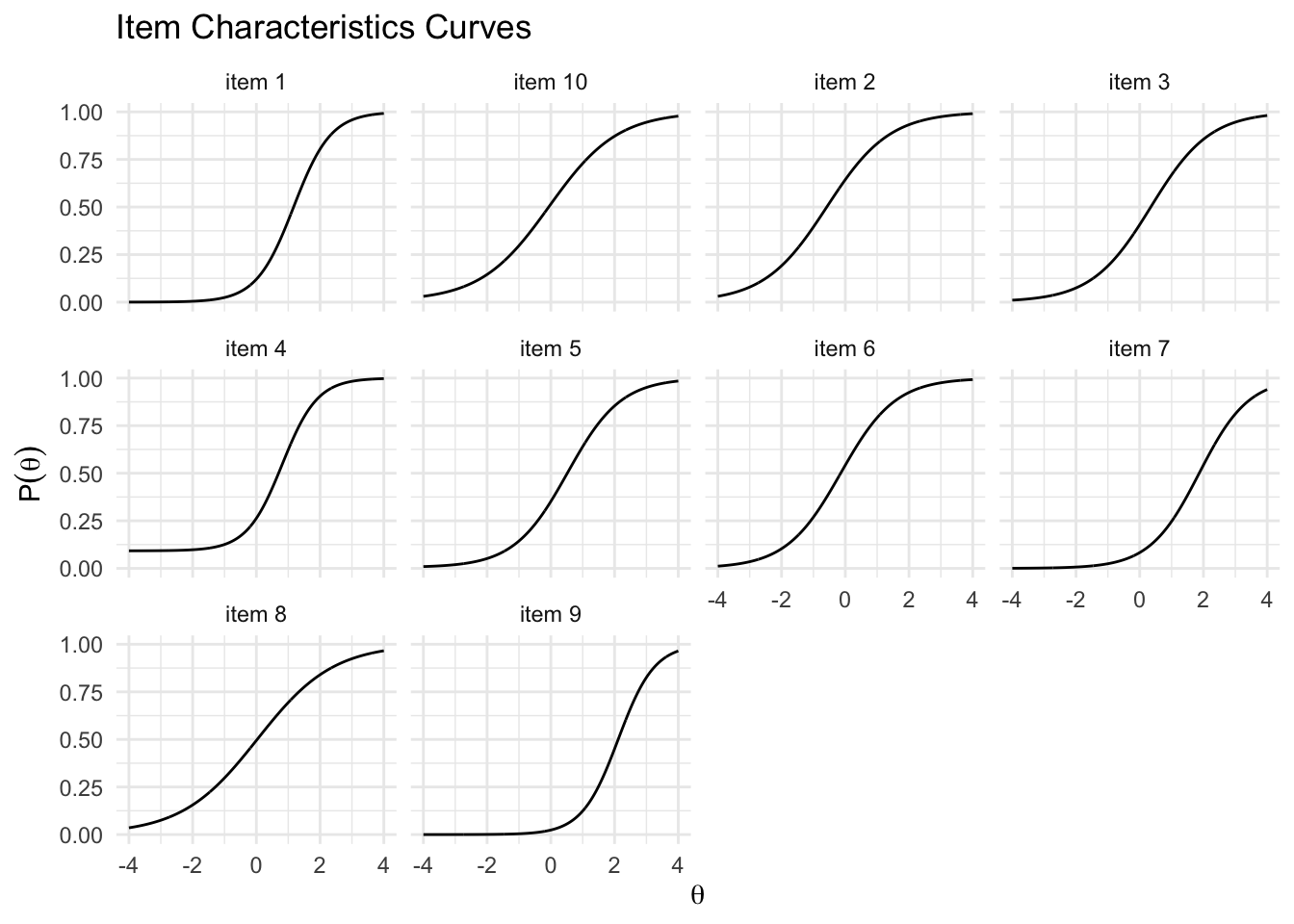
tracePlot(fit3PL, facet = F, legend = T) + scale_color_brewer(palette = "Set3")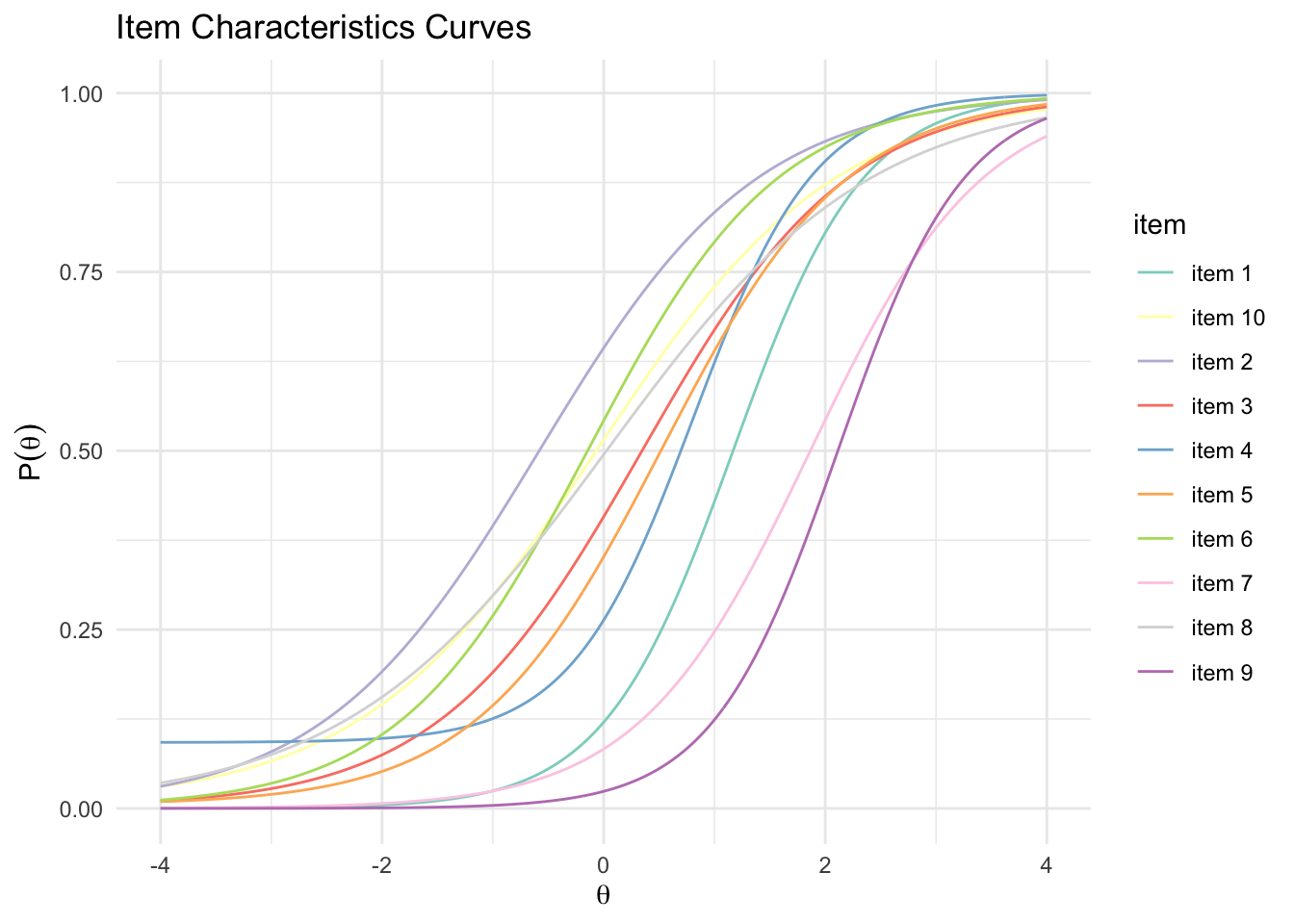
# Plotting only individual items
tracePlot(fit3PL,items = c(1:3), facet = F, legend = T) + scale_color_brewer(palette = "Set2")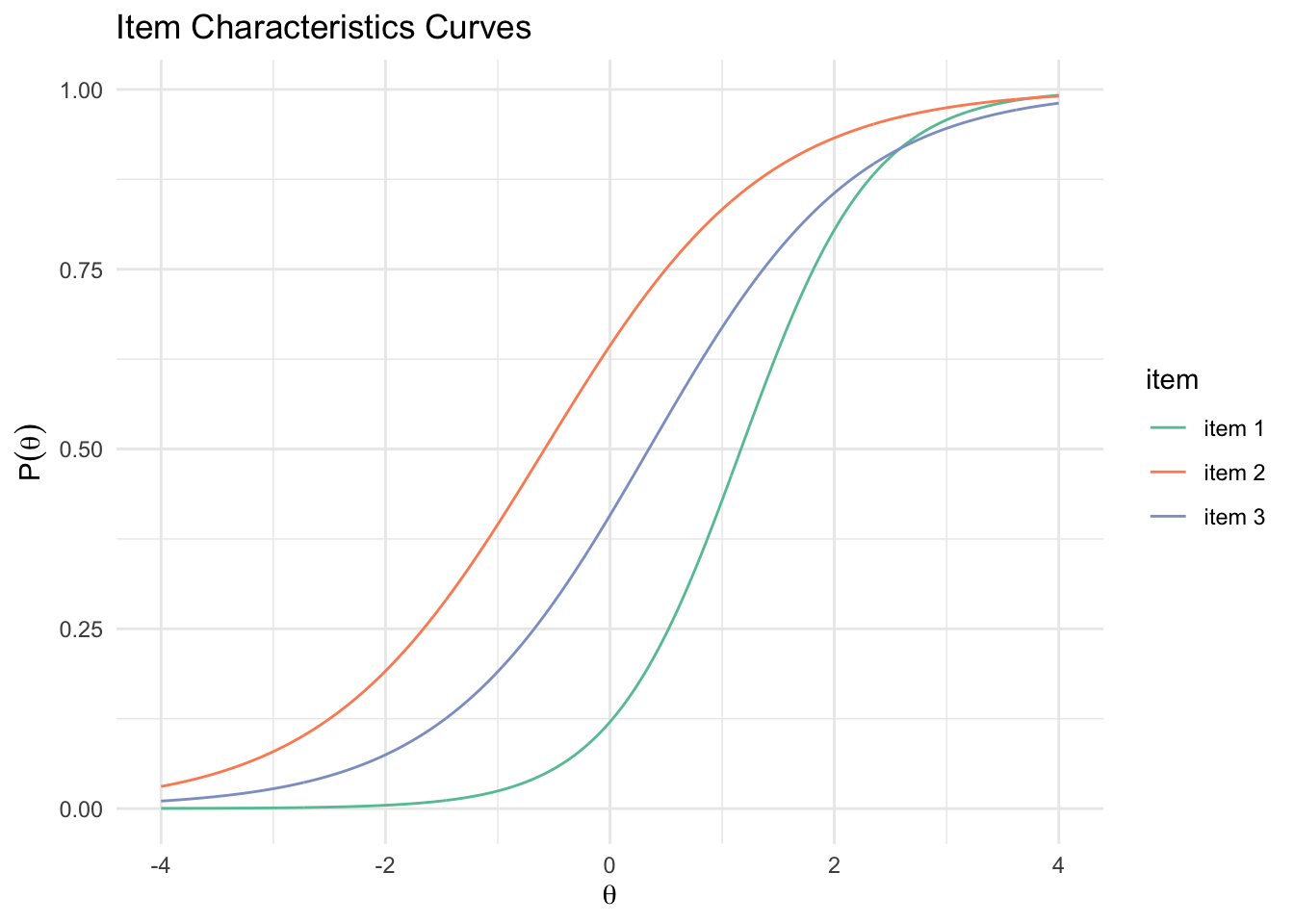
Particularly when plotted on top of each other, we can clearly see the differences in slope, difficulty, and guessing.
Item Information Curves
Another way of looking at the quality of each item is by plotting so call item information curves. Information is a statistical concept that refers to the ability of an item to accurately estimate scores on theta. Item level information clarifies how well each item contributes to score estimation precision with higher levels of information leading to more accurate score estimates.
itemInfoPlot(fit3PL) + scale_color_brewer(palette = "Set3")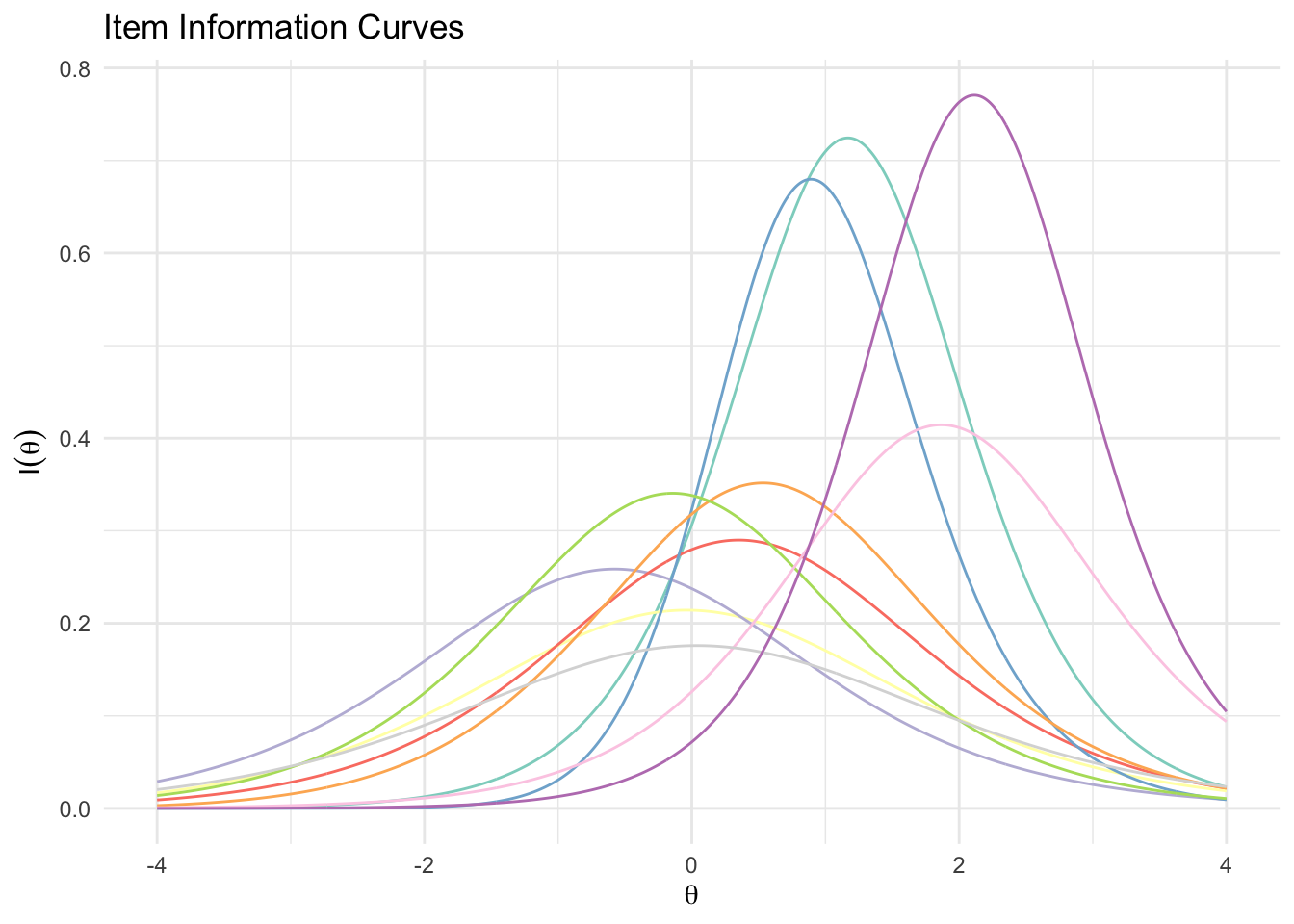
itemInfoPlot(fit3PL, facet = T)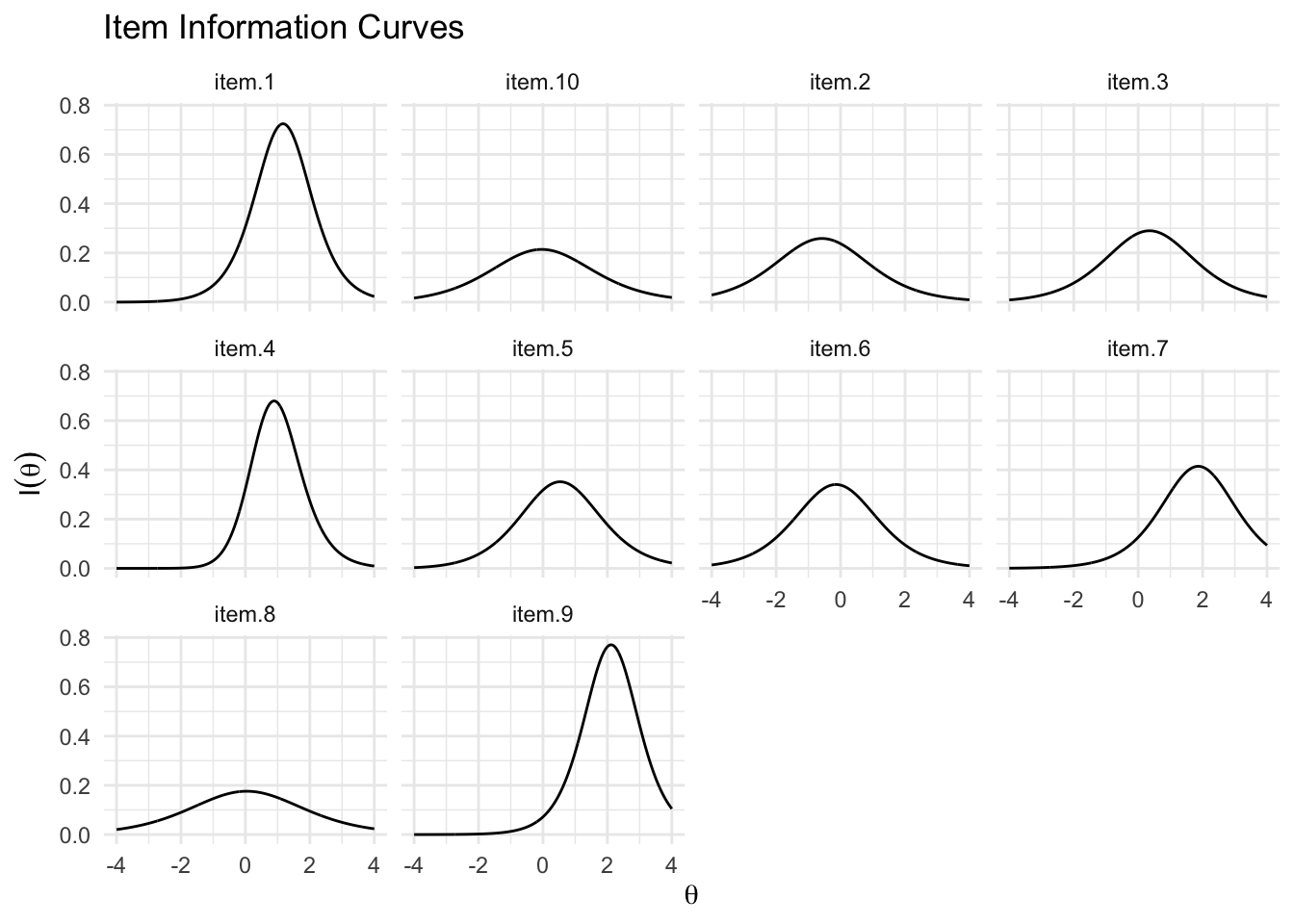
Here we, see clearly that some items offer most information on higher theta levels whereas others cover the entire range of theta.
Test Information Curves
The concept of “information” can also be applied to the entire scale. Here, we see that the scale is very good at estimating theta scores between -2 and 3, but has less precision at estimate theta scores at the extremes.
testInfoPlot(fit3PL, adj_factor = 2)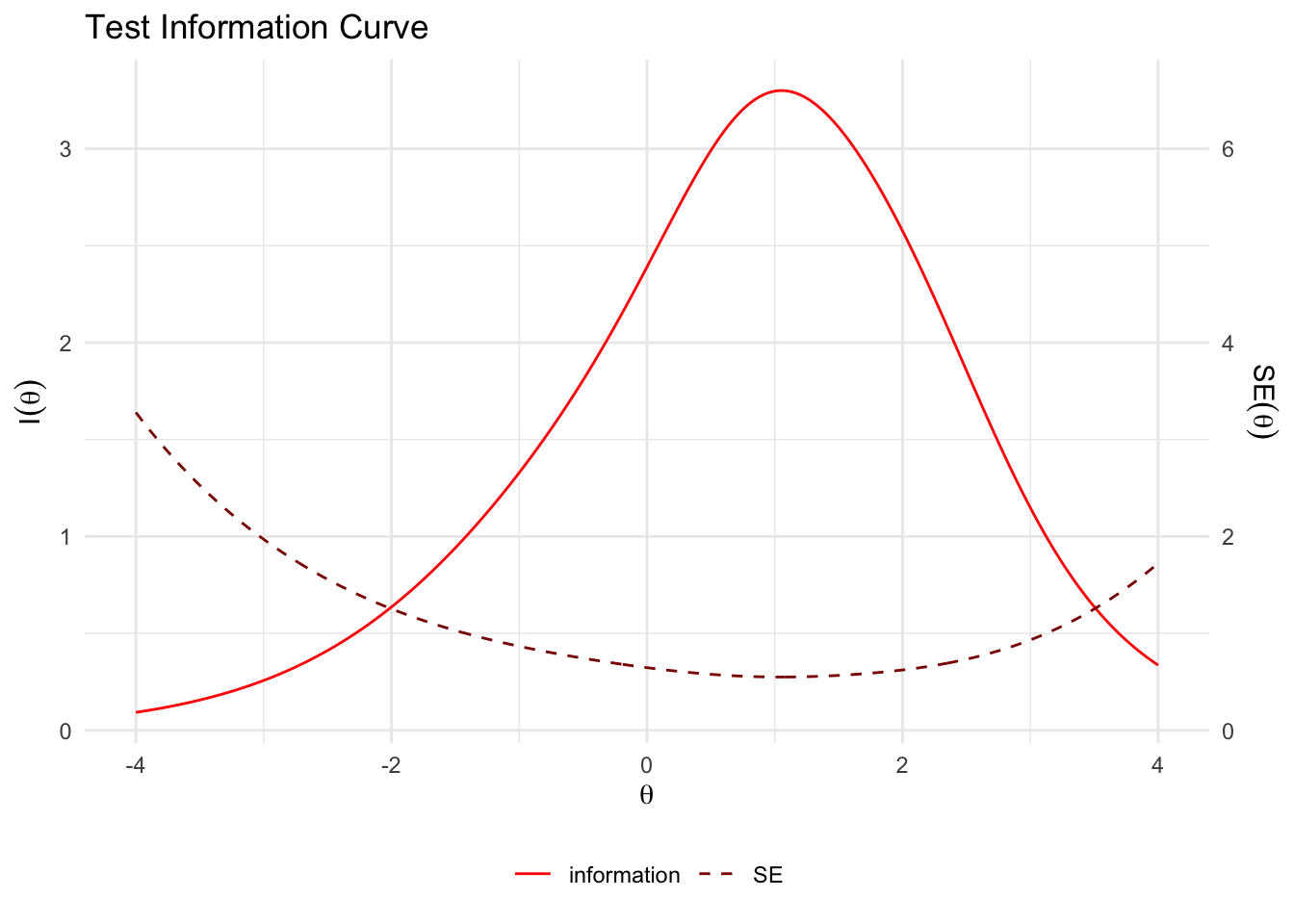
Scale Characteristic Curves
A last quality of a IRT model can be that the bare number-correct-score (sum score of correct responses) is a sufficiently good estimation of the underlying trait. A plot of the so-called scale characteristic curve allows to assess this visually by plotting the relationship between theta and the number-correct-score.
scaleCharPlot(fit3PL)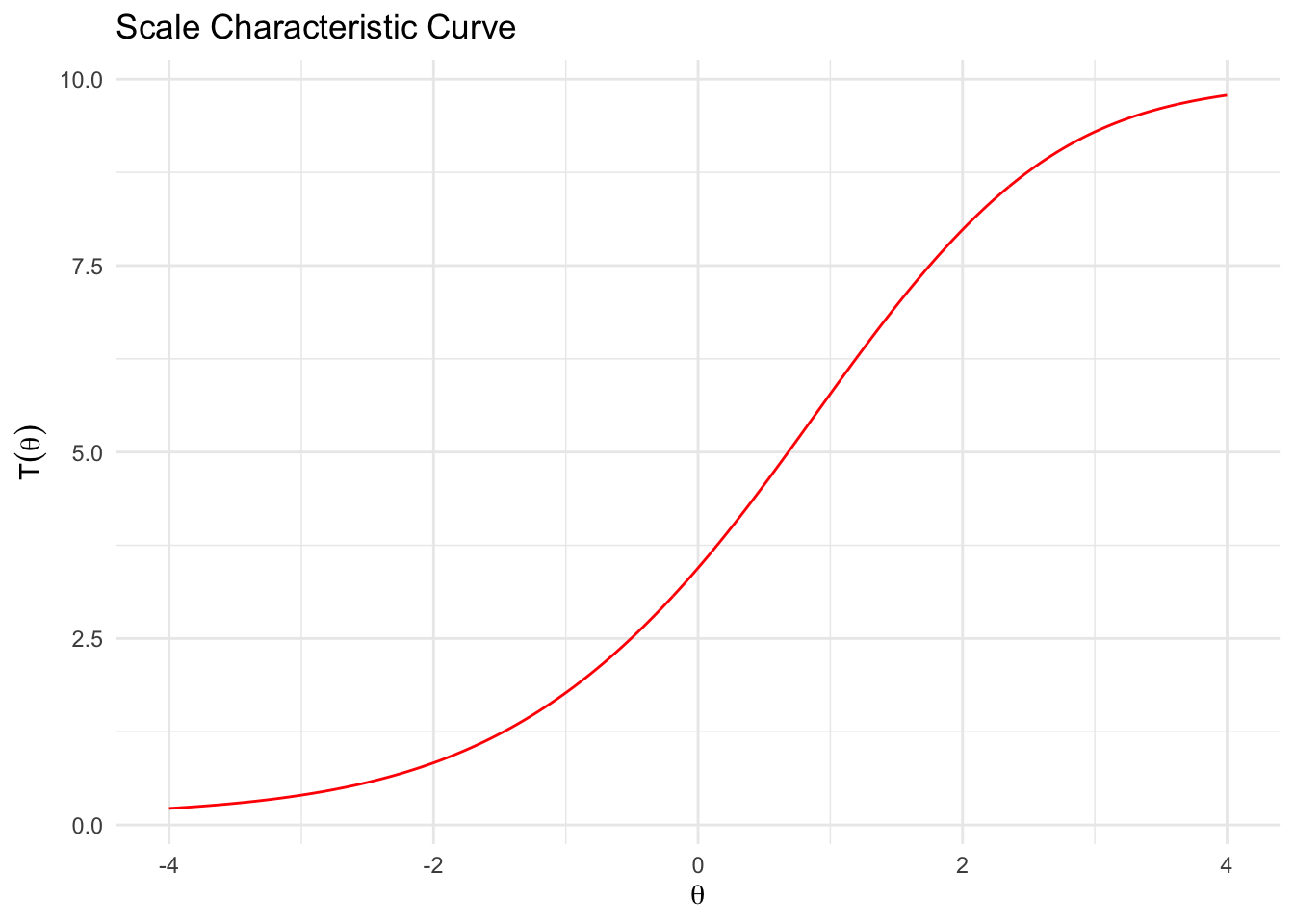
This curve usually takes the form of a S-shape as the relationship is stronger in the middle range of theta and worse at the extremes (as already seen in the test information curve). We can of course also test this with a simple correlation. First, we extract the latent IRT score using the function fscores(). We then correlate it with the simple number-correct-score.
score <- fscores(fit3PL)
sumscore <- rowSums(d)
cor.test(score, sumscore)
#>
#> Pearson's product-moment correlation
#>
#> data: score and sumscore
#> t = 181.54, df = 498, p-value < 2.2e-16
#> alternative hypothesis: true correlation is not equal to 0
#> 95 percent confidence interval:
#> 0.9910997 0.9937302
#> sample estimates:
#> cor
#> 0.9925295As we can see, they correlate almost perfectly.
2PL model
The 2PL model only differs from the 3PL model in one regard: All items are assumed to have no guessing probability. So the model only takes item discrimination (a) and item difficulty into account. The mathematical form is hence (we simply delete the part before the fraction):
\[P(\theta_j) = \frac{e^{1.7a_i(\theta_j-b_i)}}{1+e^{1.7a_i(\theta_j-b_i)}}\]
The general procedure to estimate and assess the model remains the same. I hence only pinpoint to differences and do not repeat all steps outlined for the 3PL model.
Fitting the model
fit2PL <- mirt(d, 1, itemtype = "2PL", verbose = F)
fit2PL
#>
#> Call:
#> mirt(data = d, model = 1, itemtype = "2PL", verbose = F)
#>
#> Full-information item factor analysis with 1 factor(s).
#> Converged within 1e-04 tolerance after 15 EM iterations.
#> mirt version: 1.45.1
#> M-step optimizer: BFGS
#> EM acceleration: Ramsay
#> Number of rectangular quadrature: 61
#> Latent density type: Gaussian
#>
#> Log-likelihood = -2739.232
#> Estimated parameters: 20
#> AIC = 5518.465
#> BIC = 5602.757; SABIC = 5539.276
#> G2 (1003) = 498.96, p = 1
#> RMSEA = 0, CFI = NaN, TLI = NaNCompare fit with 3PL model
We can always compare different models that are based on the same data. Using the function anova(), we can check whether the models differ based on various fit indices and a \(\chi^2\) test. In this case, the 2PL actually fits the data sightly better, but the difference is not significant.
anova(fit2PL, fit3PL)| AIC | SABIC | HQ | BIC | logLik | X2 | df | p | |
|---|---|---|---|---|---|---|---|---|
| fit2PL | 5518.465 | 5539.276 | 5551.541 | 5602.757 | -2739.232 | NA | NA | NA |
| fit3PL | 5537.377 | 5568.594 | 5586.991 | 5663.816 | -2738.689 | 1.087351 | 10 | 0.9997476 |
If we inspect the IRT parameters, the third parameter (c, here denoted as g) is fixed to 0.
coef(fit2PL, IRTpars = TRUE, simplify = TRUE)#> $items
#> a b g u
#> V1 1.699 1.168 0 1
#> V2 1.018 -0.582 0 1
#> V3 1.084 0.343 0 1
#> V4 1.275 0.657 0 1
#> V5 1.177 0.514 0 1
#> V6 1.176 -0.146 0 1
#> V7 1.286 1.868 0 1
#> V8 0.838 0.024 0 1
#> V9 1.684 2.162 0 1
#> V10 0.919 -0.070 0 1
#>
#> $means
#> F1
#> 0
#>
#> $cov
#> F1
#> F1 1Trace plot
The difference between the 3PL and the 2PL model is particularly visible in the trace plot.
tracePlot(fit2PL, theta_range = c(-5, 5), facet = F, legend = T) +
  scale_color_brewer(palette = "Set3") +
  labs(title = "2PL - Traceplot")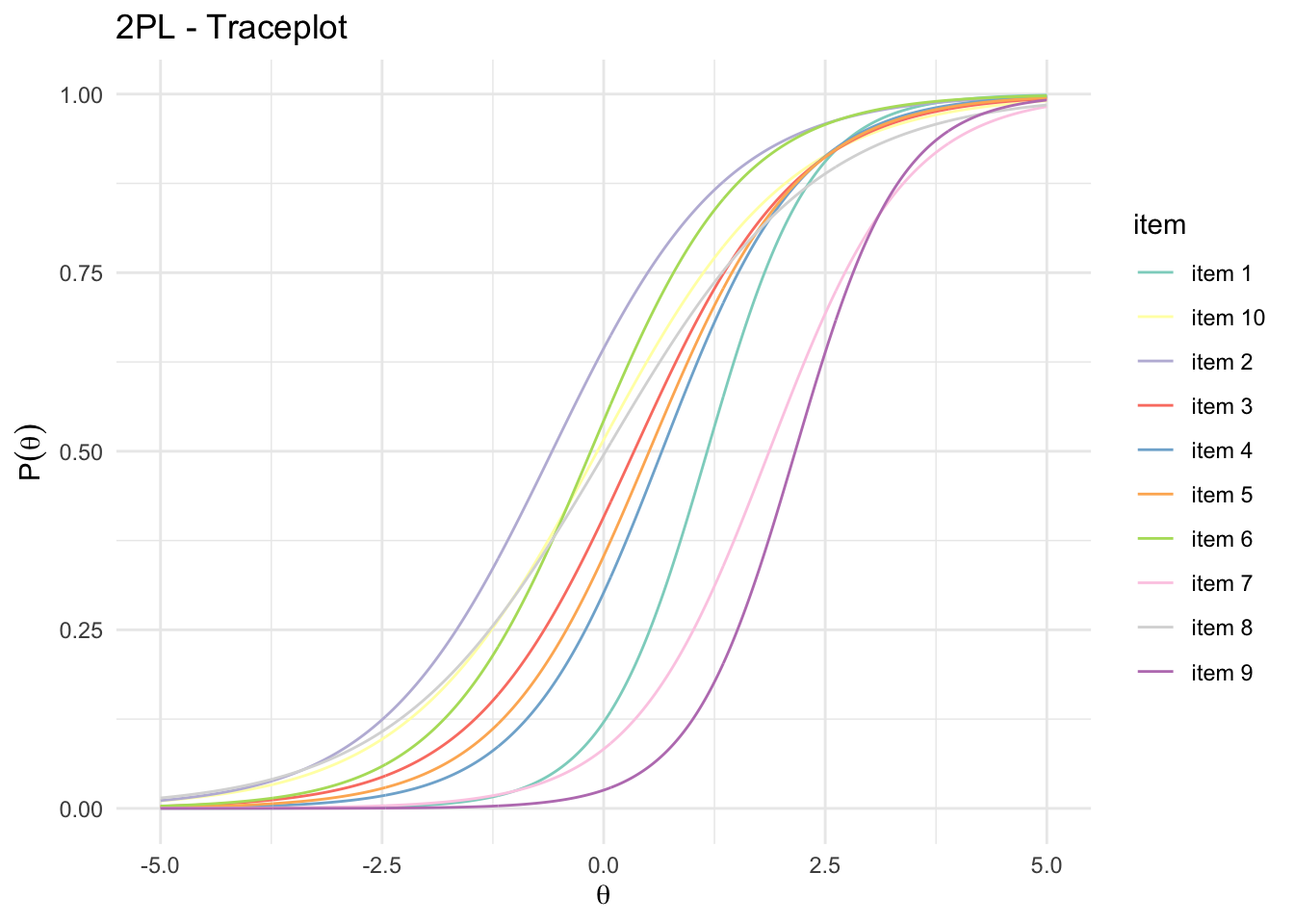
The curves have different slopes, but they do not have different asymptotes (yintercepts = guessing probability).
1PL or Rasch model
The 1PL model gets rid of yet another parameter: item discrimination. It basically constrains item discrimination to be equal across all items. Only item difficulty is allowed to vary. The mathematical form hence becomes:
\[P(\theta_j) = \frac{e^{1.7a(\theta_j-b_i)}}{1+e^{1.7a(\theta_j-b_i)}}\]
Note that there is no subscript for the letter \(a\), because it is constrained to be the same for all items. The Rasch model (stemming from a different scholarly tradition) is mathematically equivalent, but is often expressed slightly differently:
\[P(\beta) = \frac{e^{(\beta-\delta_i)}}{1+ e^{(\beta-\delta_i)}}\]
It is basically the same as the equation above, but the 1.7 constant is omitted. Further, the typical notational system uses \(\delta\) instead of \(b\) and \(\beta\) instead of \(\theta\).
This constrained model is rather an “ideal” measurement model than a model that can be perfectly fitted to the data. Yet, if we find items that fit this model sufficiently, it actually has some mathematical properties that cannot be obtained with less constrained models (e.g., 2PL or 3PL models). For this reason, many scholars favor this measurement model (particularly those following the Rasch School of Measurement)
- For this model, the number-correct score is particularly a sufficient estimation of theta.
- Due to the fixed discrimination parameter, item characteristic curves cannot cross. Items thus do not differ in how well they differentiate respondents.
- Such a model has a so-called specific objectivity: Because the Rasch model is based on the idea that items are designed to fit certain properties, instead of finding a model that fits the data, item as well as person parameter estimates are invariant across samples. Person (i.e., proficiency scores) and item parameters (i.e., item difficulty) thus will be similar even if only a subset of the item pool is used or a different population is studied. This makes it very easy to create smaller tests, parallel test or even adaptive testing pools.
Fitting the model
fitRasch <- mirt(d, 1, itemtype = "Rasch", verbose = T)fitRasch#>
#> Call:
#> mirt(data = d, model = 1, itemtype = "Rasch", verbose = T)
#>
#> Full-information item factor analysis with 1 factor(s).
#> Converged within 1e-04 tolerance after 20 EM iterations.
#> mirt version: 1.45.1
#> M-step optimizer: nlminb
#> EM acceleration: Ramsay
#> Number of rectangular quadrature: 61
#> Latent density type: Gaussian
#>
#> Log-likelihood = -2746.893
#> Estimated parameters: 11
#> AIC = 5515.786
#> BIC = 5562.147; SABIC = 5527.232
#> G2 (1012) = 514.28, p = 1
#> RMSEA = 0, CFI = NaN, TLI = NaNCompare models
anova(fitRasch, fit2PL)| AIC | SABIC | HQ | BIC | logLik | X2 | df | p | |
|---|---|---|---|---|---|---|---|---|
| fitRasch | 5515.786 | 5527.232 | 5533.978 | 5562.147 | -2746.893 | NA | NA | NA |
| fit2PL | 5518.465 | 5539.276 | 5551.541 | 5602.757 | -2739.232 | 15.32166 | 9 | 0.082471 |
If we inspect the IRT parameters, the first (a, item discrimination) is constrained to be equal and the third parameter (c, here denoted as g) is fixed to 0.
coef(fitRasch, IRTpars = TRUE, simplify = TRUE)#> $items
#> a b g u
#> V1 1 1.673 0 1
#> V2 1 -0.618 0 1
#> V3 1 0.374 0 1
#> V4 1 0.798 0 1
#> V5 1 0.593 0 1
#> V6 1 -0.174 0 1
#> V7 1 2.304 0 1
#> V8 1 0.018 0 1
#> V9 1 3.138 0 1
#> V10 1 -0.073 0 1
#>
#> $means
#> F1
#> 0
#>
#> $cov
#> F1
#> F1 1.302Trace plot
Again, the difference between the 3PL, 2PL and the 1PL (Rasch) model is particularly visible in the trace plot:
tracePlot(fitRasch, theta_range = c(-5, 5), facet = F, legend = T) +
  scale_color_brewer(palette = "Set3") +
  labs(title = "1PL - Traceplot")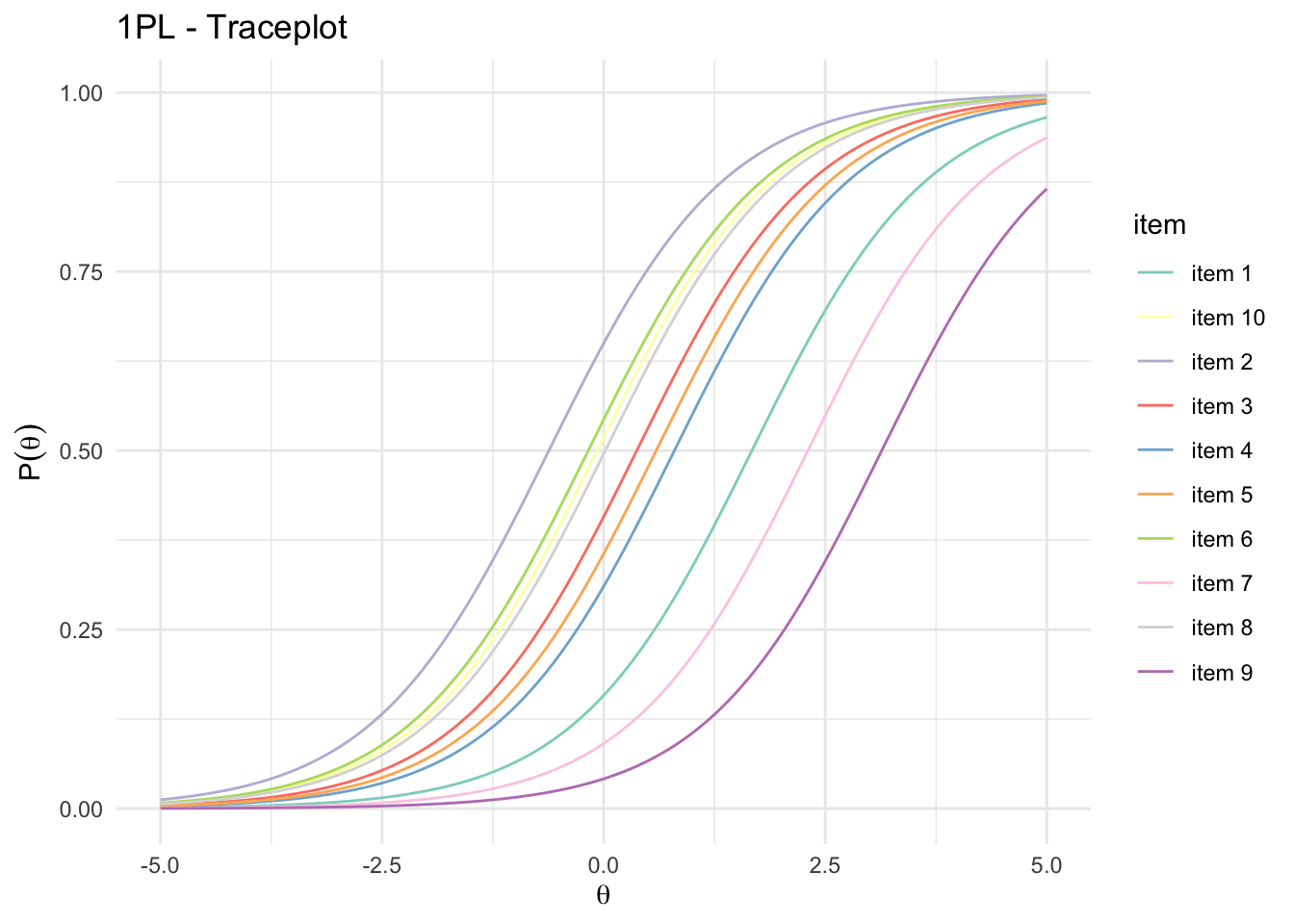
All items have the exact same slope.
Creating smaller tests or parallel tests
itempersonMap(fitRasch)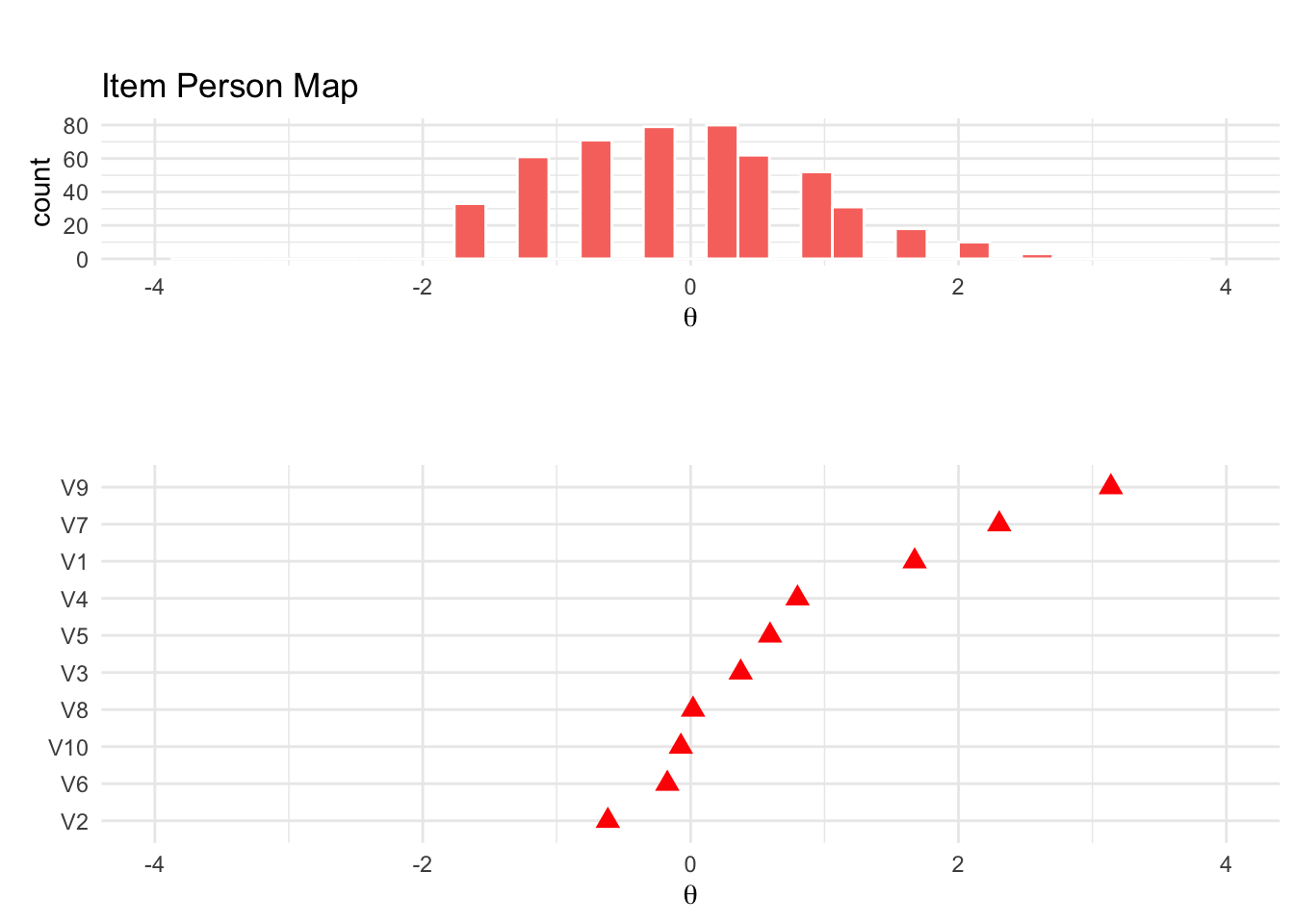
We can create smaller, but parallel tests by distributing similar items into to subset pools. Here, I am simply inspecting the item person map and try to form to sets that equally cover the range of the latent ability.
subset1 <- d %>%
  select(V2, V10, V3, V4, V7)
subset2 <- d %>%
  select(V6, V8, V5, V1, V9)

test1 <- mirt(subset1, 1, itemtype = "Rasch", verbose = F)
test2 <- mirt(subset2, 1, itemtype = "Rasch", verbose = F)
We can assess their similarity be plotting two test information curves on top of each other:
testInfoCompare(test1, test2)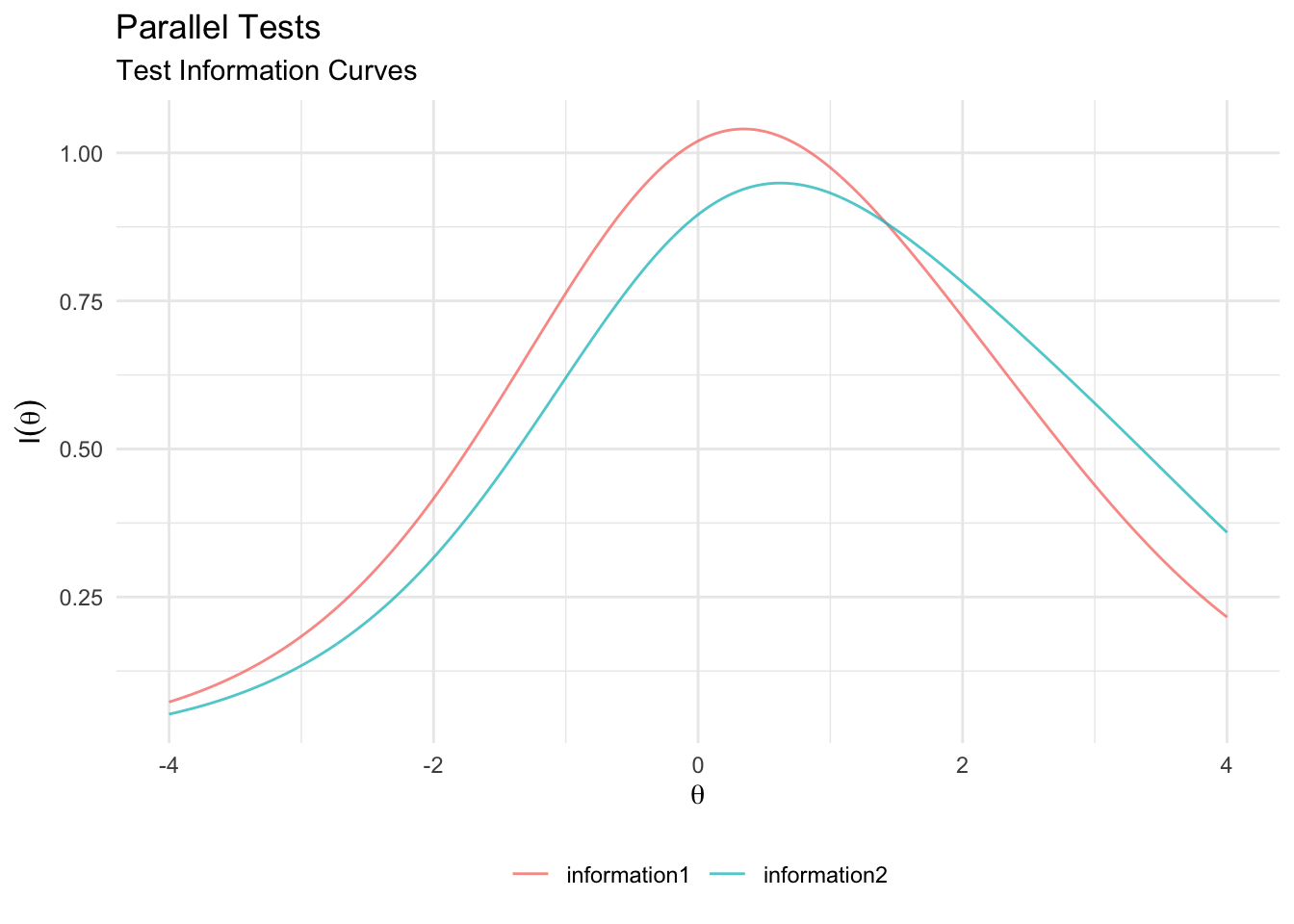
As we can see, both test sufficiently overlap in their information curve. So they are very likely to correlate highly with the original test
cor.test(fscores(test1), fscores(fitRasch))#>
#> Pearson's product-moment correlation
#>
#> data: fscores(test1) and fscores(fitRasch)
#> t = 41.294, df = 498, p-value < 2.2e-16
#> alternative hypothesis: true correlation is not equal to 0
#> 95 percent confidence interval:
#> 0.8582740 0.8981538
#> sample estimates:
#> cor
#> 0.8797522cor.test(fscores(test2), fscores(fitRasch))#>
#> Pearson's product-moment correlation
#>
#> data: fscores(test2) and fscores(fitRasch)
#> t = 38.389, df = 498, p-value < 2.2e-16
#> alternative hypothesis: true correlation is not equal to 0
#> 95 percent confidence interval:
#> 0.8405774 0.8851290
#> sample estimates:
#> cor
#> 0.864542Where to go next?
IRT is a broad field and there are many more models (e.g., graded response models, multidimensional models, 4PL models…). A good starting point is the extended literature:
DeMars, C. (2010). Item response theory. Oxford University Press.
Embretson, S. E., & Reise, S. P. (2013). Item response theory (2nd ed.). Psychology Press.
There are also good online resources:
- Website dedicated to Rasch modeling: https://www.rasch.org/
References
DeMars, C. (2010). Item response theory. Oxford University Press.
Orlando, M. & Thissen, D. (2000). Likelihood-based item fit indices for dichotomous item response theory models. Applied Psychological Measurement, 24, 50-64.
Mehrdad Vossoughi · 9 November 2022
Dear Sir’
I really appreciate you for this valuable page. I found it very useful, and I want to know whether you have another course on IRT for Likert items?
Sincerely yours,
Mehrdad Vossoughi
PhD in Biostatistics
Philipp Masur · 22 November 2022
Dear Mehrdad,
have a look at this tutorial for the graded response model: https://github.com/ccs-amsterdam/r-course-material/blob/master/tutorials/R_test-theory_3_irt_graded.md
Might contain what you are looking for!
Best,
Philipp